AI Classification
You are able to classify the items in your system using AI. The AI will evaluate and assign items to the classes within the classification.
Prerequisites
To use an AI to classify the items in your system an AI Classification Service must be set up. For help setting this up see our guide on AI Enrichment Services.
The AI model must also be configured to use this feature. For help setting this up see out guide on AI Model Services.
Enabling AI Classifications
Items cannot be classified using an AI Classification unless it is enabled.
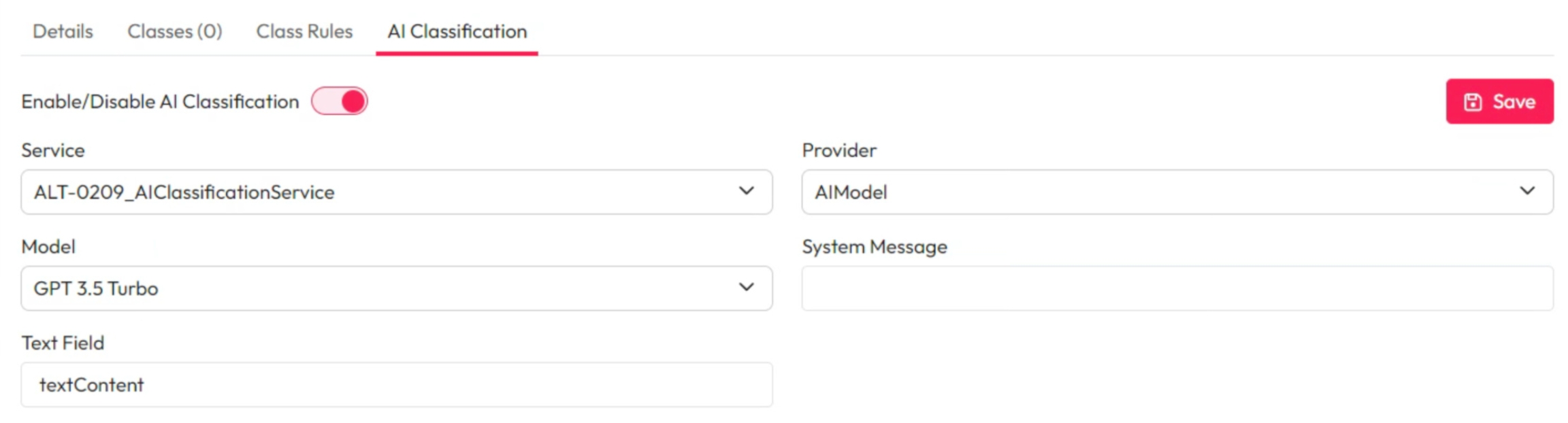
Within the relevant Classification then select the AI Classifications tab.
Use the Enable/Disable AI Classification toggle to turn this on or off.
Manage AI Classifications
Service: Choose the service to use from the dropdown.
Provider: Choose the provider to use from the dropdown.
Model: Choose the model to be used from the dropdown.
System Message: Add any specific or additional information to help the AI correctly classify your items.
You can add detail about each class if they have generic names. You can add business specific details to suit your use case.
Text Field: Enter the type of text that be used by the AI to classify items.
This by default will be textContent and will rarely need changing.