# Enabling Enrichment Steps
There are several steps to enable enrichment steps.
{% hint style="info" %}
We are working to replace these steps with a user interface in Control Hub.
{% endhint %}
## **Export**
1. Navigate to the utils folder in your Workplace AI installation.
* On a a multi-server enrichment, you can pick any where Index Utils are set up.
2. Navigate to `InsightMaker.IndexUtils`
3. Export your AI Registration Configuration using the following command: `InsightMaker.IndexUtilities.exe export --ai-registration-configuration C:\tmp\ai.json`
4. Open the export in an editor.
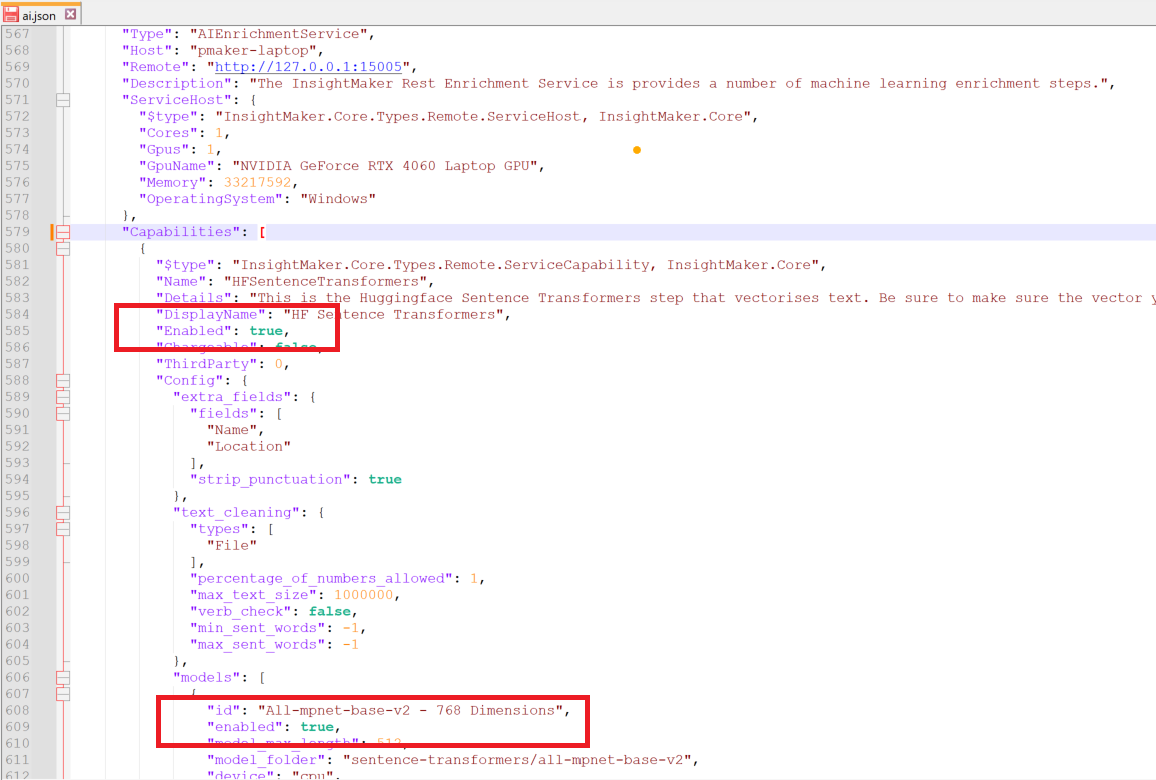
5. Find the AI Enrichment Service for the relevant host name.
6. Enable the steps and optional models you want to use.
Enable Steps
7. Once enabled import the new config using: `InsightMaker.IndexUtilities.exe import--ai-registration-configuration C:\tmp\ai.json`
8. Re-start the AI Enrichment Service.
* You should see a log like the below example.
* Depending on the steps enables the models may take a while to download.