# Livelink
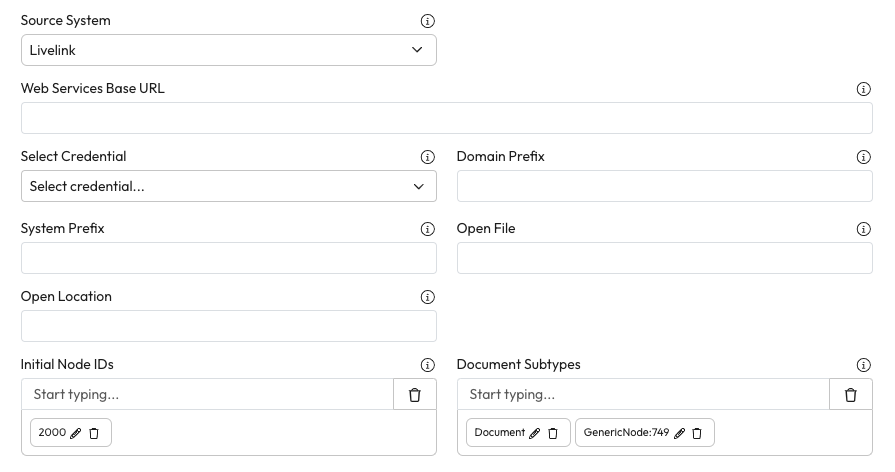
Connect LiveLink to Workplace AI to make the most of your data. Once you have selected a Source System type more detail will expand to customise this.
## General
1. **Web Services Base URL:** Enter the base URL for the OT web services.
* This must include a trailing /
* For example -
2. **Select Credential:** Choose the username and password for the server from the dropdown.
3. **Domain Prefix:** Enter the prefix used to identify domain users and groups.
4. **System Prefix:** Enter the prefix used to make Content Server Node IDs and Users and Groups unique.
* This must match the value in the corresponding security sync.
5. **Open File:** Enter the URL template for opening a file in Content Server.
* This accepts a single placeholder for the node ID.
6. **Open Location:** Enter the URL template for opening a folder in Content Server.
* This accepts a single placeholder for the node ID.
7. **Initial Node IDs:** Enter a list of Node IDs to start the crawl from.
* Type them in and hit enter. These IDs can be edited and removed.
8. **Document Subtypes:** Enter the list document subtypes to include in the crawl.
***
## Category/Attribute Filter
1. **Category Attribute:** Enter the Category and attribute name to file on. This must be formatted Category:Attribute.
* For example - Migration Category:Migrated
2. **Attribute Value:** Enter the value that should be tested.
* For example - HIVE
3. **Exclude:** Check this if matching nodes should be excluded from the crawl.
* Nodes that do not have a category will be treated as note matching.
***
## Renditions
1. **Index Renditions as separate documents:** Check this to index the latest original and latest PDF as separate documents.
1. If not checked only the latest version will be indexed.
2. **Rendition Extension:** Enter the extensions used by renditions.
***
## RES Migration Specific
1. **RES Migration:** Check this to include all issued and approved versions and where applicable, rendition and draft versions.