# Jira
Connect a Jira source to Workplace AI to make the most of your data. This includes the ability to be able to connect to Jira Service Desk.
1. **Source System:** Select Jira from the dropdown.
## Initial Configuration Steps
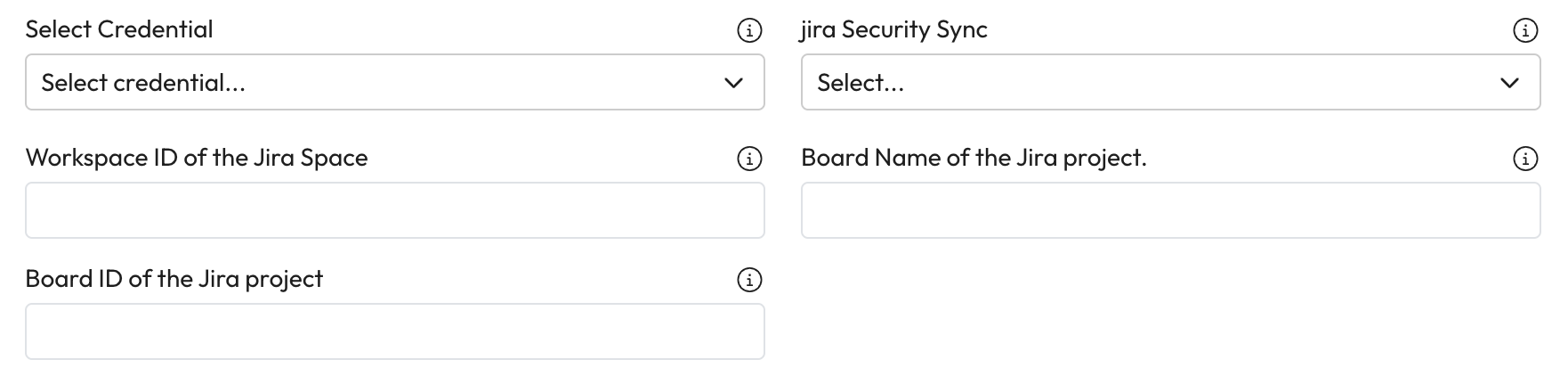
1. **Select Credential:** Search and select the credential that will be used to connect to Jira from the dropdown.
* *For support setting up credentials use* [*our guide on managing credentials.*](https://docs.aiimi.com/aiimi-insight-engine/control-hub/security/credentials)
2. **jira Security Sync:** Enter the ID of a configured Jira security sync.
* This sync allows Workplace AI to connect user groups from Jira and Workplace AI users. This helps ensure the permissions from Jira are upheld.
3. **Worspace ID of the Jira Space:** Enter the base URL of the Jira workspace that should be crawled.
* Example -
4. **Board Name of the Jira project:** Enter the name of the Jira project board that should be crawled.
5. **Board ID of the Jira project:** Enter the board ID of the board that should be crawled.
***
## Completed the Source section
1. Once you have completed this section, select Crawl. [Learn how to complete the source Crawl set up.](https://docs.aiimi.com/aiimi-insight-engine/control-hub/agents/configurations/source-configurations/source-crawl)