# Confluence
Connect a Confluence source to Workplace AI to make the most of your data.
1. **Source System:** Select Confluence from the dropdown.
## Initial Configuration Steps
1. **Select Credential:** Search and select the credential that will be used to connect to Confluence from the dropdown.
* *For support setting up credentials use* [*our guide on managing credentials.*](https://docs.aiimi.com/aiimi-insight-engine/control-hub/security/credentials)
2. **Confluence Base URL:** Enter the URL used to access your Confluence area.
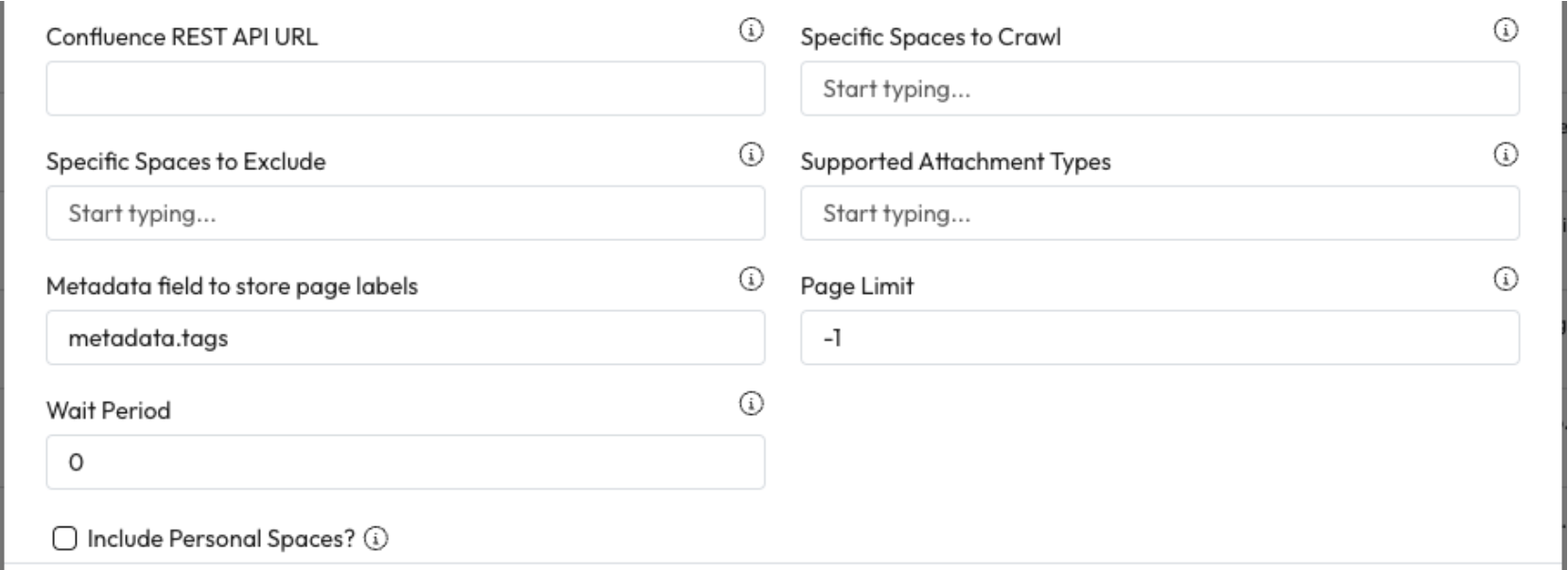
3. **Confluence REST API:** Enter the REST API URL. This is normally the base URL followed by /rest.
***
## Inclusions and Exclusions
1. **Specific Spaces to Crawl:** Enter the specific spaces you want to crawl and select Add.
* If left blank all spaces will be crawled.
2. **Specific Spaces to Exclude:** Enter the specific spaces you don't want to crawl and select Add.
* If left blank no spaces will be skipped.
3. **Supported Attachment Types:** Enter the document types that should be included and select Add.
* If left blank, everything will be added including all on page images.
4. **Metadata Field to Store Page Labels:** Enter the Metadata field within the index where page labels should be stored.
5. **Page Limit:** Enter the maximum number of pages and blogs that will be processed per space.
* Set to -1 (no limit) by default.
6. **Wait Period: Enter a period of time in milliseconds to lim**it the frequency of requests made to this source.
* Set to 0 (no wait period) by default.
7. **Include Personal Space:** Check to also crawl personal spaces.
* This will only crawl spaces the selected credential has access to.
***
## Completed the Source section
1. Once you have completed this section, select Crawl. [Learn how to complete the source Crawl set up.](https://docs.aiimi.com/aiimi-insight-engine/control-hub/agents/configurations/source-configurations/source-crawl)