# Azure Blob Storage
Connect your Azure Blob Storage toWorkplace AI to make the most of the data on your machines.
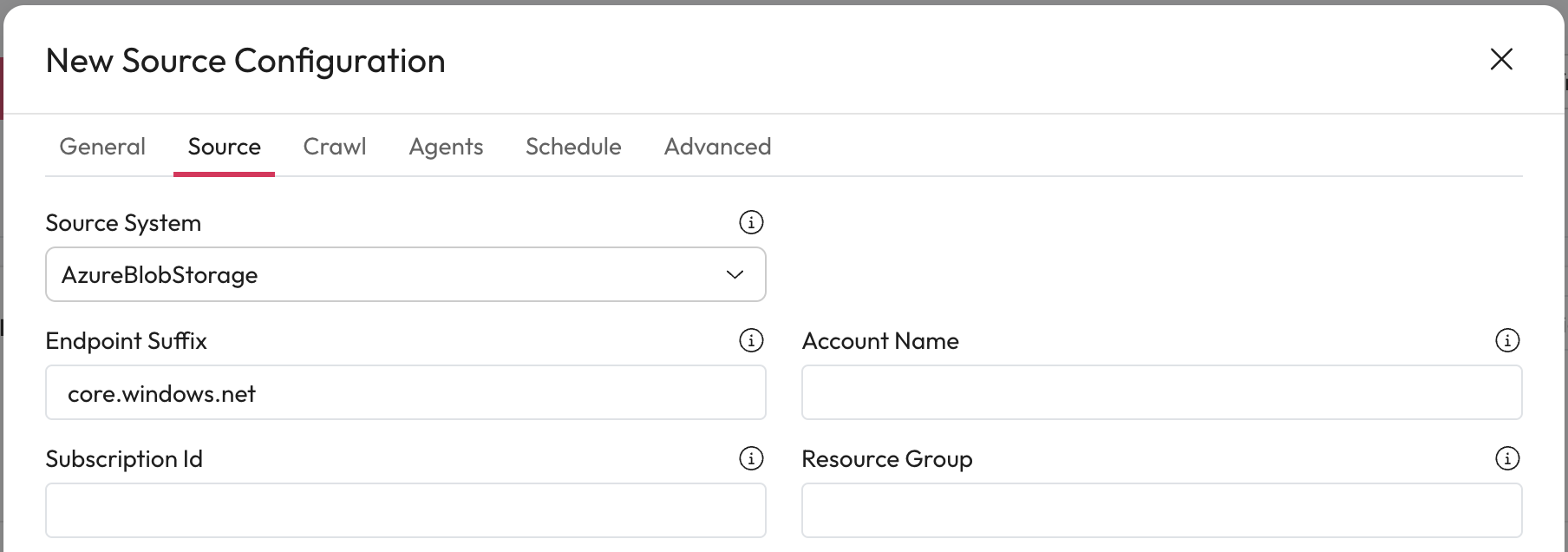
1. **Source System:** Select Azure Blob Storage from the dropdown.
## Initial Configuration Steps
1. **Endpoint Suffix:** Change the Endpoint Suffix to match your Azure Blob Storage system if necessary.
* In most cases, you won't need to change this.
2. **Account Name:** Enter the name of the account to be crawled.
3. **Subscription ID:** Enter the storage accounts Subscription ID to open file locations from Workplace AI in Azure Storage Explorer.
* This allows URLs to be created and used for access.
4. **Resource Group:** You must also enter the associated Resource Group to open file locations.
***
## Accounts and Connections
1. **Access Key Type:** Select either SAS or Account from the dropdown.
2. **Select Credential:** Select the credential from the dropdown that matches this key.
* To set up a credential use [our guides for creating and editing credentials.](https://docs.aiimi.com/aiimi-insight-engine/control-hub/security/credentials)
3. **Containers:** Specify the containers that are crawled.
* If left blank, all containers will be crawled.
***
## Metadata Mappings
Map your Workplace AI metadata fields to meta tags in Azure Blob Storage.
1. **Add New Item:** Select this to add a new metadata mapping.
2. **Metadata Field:** Enter the full metadata field from Workplace AI in the left column.
* This is case sensitive
3. **Azure Blob Meta Tag:** Enter the Azure Blob meta tag name that you want to map in the right column.
* For Example, subject
4. **Save the Mapping:** Select the check to save this mapping.
***
## Completed the Source section
1. Once you have completed this section, select Crawl. This will take you to the Crawl section for this source. [Learn how to complete the source Crawl set up.](https://docs.aiimi.com/aiimi-insight-engine/control-hub/agents/configurations/source-configurations/source-crawl)